

Knowing how to use NotebookLM has become the ultimate competitive advantage for professionals seeking to master information overload.
In this technical guide, we teach you step by step how to configure this Google assistant so that you stop searching for data and start understanding it.
To help you make the most of this cutting-edge AI tool, we have structured this content so that you will be able to:
- Create professional notebooks from scratch.
- Analyse PDFs and videos without errors and with citations.
- Generate podcasts and automatic summaries.
- Apply AI tailored to your specific needs.
- Protect your data and intellectual property.
What is NotebookLM and why does it revolutionise information management?
If you are wondering what NotebookLM is, the short answer is that it is a personalised research and writing assistant, developed by Google, that uses advanced artificial intelligence to help you make sense of large volumes of data.
Unlike other generic chatbots, its differentiating value lies in source-grounding.
Whereas tools such as ChatGPT extract information from across the entire internet, NotebookLM is strictly limited to the documents you provide. This virtually eliminates AI hallucinations and guarantees that every response is accurate, directly citing the exact paragraph from your source.
Why is it changing the rules of the game?
In our experience analysing productivity tools, NotebookLM represents an evolution in knowledge management for three key reasons:
- Deep-context AI: Thanks to the Gemini engine, it can process up to 50 sources per notebook (including PDFs, YouTube transcripts, and lengthy documents) without losing the thread of the conversation.
- Verifiable citations: Every time the AI generates a response, it includes numbered bubbles that, when clicked, take you to the exact point in the original document. For academic or technical profiles, this traceability is invaluable.
- Creative multimodality: It does not merely summarise text. Its ability to transform dense data into audio summaries, podcasts, or structured study guides allows you to consume information in a far more agile and human manner.
NotebookLM revolutionises information management because it ceases to be a search tool and becomes a tool for understanding. You no longer read your documents; you establish a dialogue with them to extract conclusions in minutes that would previously have required days of reading.
How to use NotebookLM step by step: From registration to your first source
To begin working with this AI, you do not need to install complex software—everything is managed from the Google cloud.
Here are the essential steps to set up your working environment:
Access and login
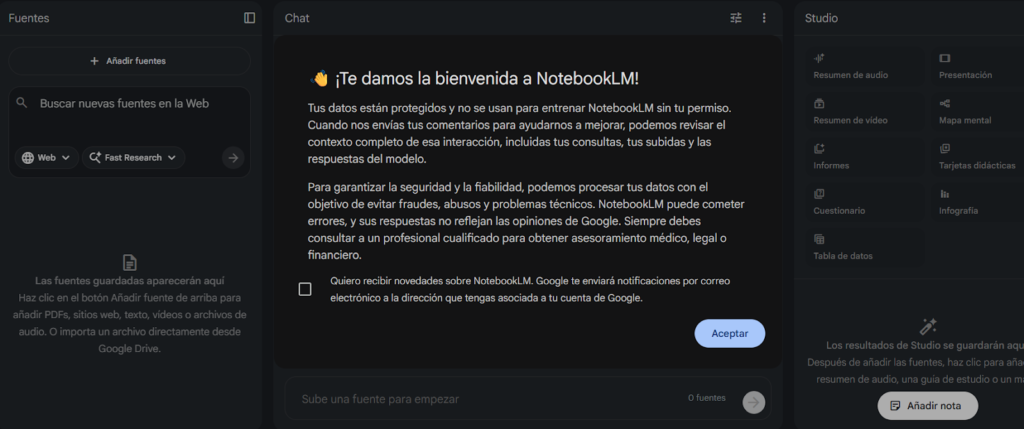
Go to the official NotebookLM website. Click the Try NotebookLM button and sign in with your personal Google account or your Google Workspace profile.
Creating a new notebook
Once inside the main panel, click the + Create notebook icon. Bear in mind that each notebook functions as an independent project where the AI will only know the information you choose to include.

Uploading information sources
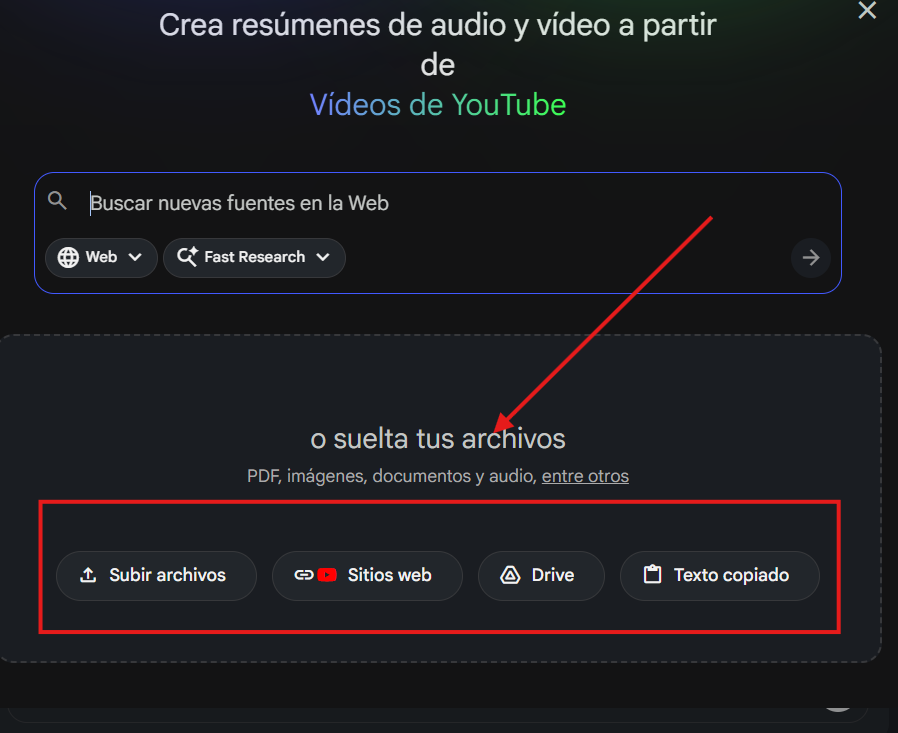
A pop-up window will open where you can add your documents. Currently, NotebookLM supports:
- Local files: PDFs, text files (.txt), and Markdown.
- Google Drive: Documents and Presentations from your drive.
- Web links: URLs of articles or informational websites.
- YouTube: Links to videos (the AI will analyse the content transcript).
Automatic generation of the notebook guide
As soon as you upload your sources, the tool will process the data and present you with an executive summary, keywords, and suggested questions to begin your research.
Formats and limits you should know
To ensure your workflow is impeccable, bear in mind that NotebookLM allows up to 50 sources per notebook, and each of them can contain up to 500,000 words. This provides you with massive analytical capacity for deep research projects or extensive content audits.
To obtain the best responses, ensure that your PDF files contain selectable text (OCR). If you upload a scanned image without text recognition, the AI will not be able to read the content and the accuracy of responses will be diminished.
The NotebookLM notebook: How to organise your projects professionally
A NotebookLM notebook is divided into three fundamental areas that you must master to ensure your information flow is impeccable.
The sources panel (inputs)
This is the inventory of all the knowledge you have injected into the project.
Do not mix subject areas. If you are designing a marketing strategy, create an exclusive notebook for it. If you are studying legislation, create another. This way, you will prevent the AI from cross-referencing concepts that have no relation to one another.
The interaction area or chat
You can ask cross-cutting questions that connect several sources simultaneously. When working within your NotebookLM notebook, the AI does not search the internet; instead, it analyses your documents to provide you with responses grounded in real, professional context.
The notes panel (outputs)
This is the place where you consolidate your knowledge. Within a notebook, you can manage two types of notes:
- Written notes: Your own ideas, conclusions, or drafts.
- Pinned notes: Fragments of AI responses that you consider valuable and wish to preserve for your final document.
Organisation strategy by entities
For professionals seeking advanced management, we recommend naming each NotebookLM notebook following a clear nomenclature. This not only helps you but also ensures that, when sharing the notebook with other collaborators, the information hierarchy is evident from the very first glance.
Remember that each notebook is a secure environment. Being built on the Google Cloud infrastructure, the information you organise in your notebooks is not used to train public AI models, ensuring that your trade secrets or academic work remain private.
Advanced NotebookLM features: Podcasts, summaries, and source analysis
What truly sets this platform apart in the saturated AI market are its post-processing tools.
Some of the functionalities that are redefining productivity:
Audio overview
This is the flagship feature. NotebookLM can generate an audio summary in which two artificial voices (with human-like intonation and rhythm) hold a conversation about your sources.
- Real-world value: Ideal for reviewing complex materials while driving or exercising.
- Critical analysis: They do not merely read aloud—the AI presenters synthesise, inject humour, and establish logical connections between your documents, making dense topics easy to digest.
The power of Gemini and its context window
NotebookLM runs on the Gemini architecture, which grants it a massive short-term memory (context window). This enables:
- Multimodal analysis: You can upload a YouTube video URL and NotebookLM will analyse not only the transcript but will also be capable of understanding the visual context of the content.
- Complex reasoning: Unlike smaller models, Gemini identifies contradictions between two different sources (for example, if one report states “A” and another states “B”) and alerts you accordingly.
Structured summaries and study guides
Within the Studio section, you can ask the tool to automatically generate:
- Executive reports ready to present in a meeting.
- Frequently asked questions and answers extracted directly from your manuals or notes.
- Study guides with quizzes and key terms to facilitate active learning.
NotebookLM’s ability to cross-reference data from such diverse sources (a video, a PDF, and a voice note) without losing coherence represents a qualitative leap. For marketing and development agencies, this reduces onboarding time on new projects from days to merely a few hours.
Practical use cases: Apply NotebookLM in academic and business environments
The versatility of this tool enables highly diverse profiles to find a second brain capable of processing complex information.
Academic setting
For researchers and postgraduate students, the volume of pending reading is the greatest obstacle. NotebookLM enables:
- Literature reviews: Upload up to 50 scientific articles on the same topic and ask the AI to identify contradictions between authors or gaps in current research.
- Thesis and dissertation preparation: Organise your entire bibliography in a single notebook and automatically generate event timelines or glossaries of technical terms.
- Active learning: Transform your notes into self-assessment quizzes to test your knowledge before an examination.
Business environment
In a business setting, information tends to be fragmented. NotebookLM acts as a centralising hub:
- Onboarding and technical manuals: Instead of requiring a new employee to read hundreds of pages, create a notebook with the operational manuals. The employee can directly ask: “What is the protocol if the server fails?” and obtain the answer with the exact citation.
- Meeting summaries: Upload the transcripts of your Google Meet or Zoom meetings. The AI will extract the key points, the decisions made, and—most importantly—the list of pending tasks for each team member.
- Consultancy and legal strategy/Compliance: NotebookLM is capable of auditing contracts and complex regulations in seconds. You can upload several commercial agreements and ask: “What penalties exist for early termination across all these contracts?” The AI will compare the documents and provide you with a unified answer with direct citations to the relevant clauses, eliminating the risk of human error in manual review.
- Competitive intelligence and market analysis: Ideal for marketing and sales departments. By uploading competitors’ performance reports, market studies in PDF format, or transcripts of industry conferences, you can ask the tool to identify emerging trends or weaknesses in your competitors’ products that your company can capitalise on.
- Technical support and customer success: Transform your knowledge base into an interactive assistant for your employees. If you upload the history of resolved tickets and product manuals, the support team can obtain instant solutions to complex technical problems based on the company’s previous experiences, drastically reducing client response time.
- Tender management and public projects: For companies participating in public tenders, NotebookLM enables the analysis of technical and administrative specifications spanning hundreds of pages. You can enquire about specific technical requirements, delivery deadlines, or scoring criteria, ensuring that your proposal complies 100% with the tender requirements.
Creative sector
Writers, screenwriters, and content creators use notebooks to maintain narrative coherence:
- Continuity control: Novel writers upload their drafts to ask questions such as: “In which chapter did I mention that the protagonist was left-handed?”
- Content curation: Journalists can upload dense current affairs reports and ask the AI to draft a thread for X (Twitter) or a video script for TikTok while maintaining an informative tone.
What truly adds value to NotebookLM in day-to-day use is not that it writes for you, but that it thinks with you. By reducing search and synthesis time, it allows the professional to focus on strategic decision-making, which is where true human talent resides.
Security and privacy: What does Google do with your source data?
Google has designed this tool with layers of privacy that differentiate it from the free version of other chatbots.
Here are the key points for your peace of mind and that of your company:
- Your data does not train the public AI: Google has explicitly stated that the data you upload, the questions you ask, and the responses you receive are not used to train its global AI models—unless you voluntarily choose to submit feedback on a specific response.
- Information isolation: Each notebook is a sealed silo. The information from one project does not leak into another, nor is it accessible to other users unless you explicitly decide to share access, just as you would with a Google Drive file.
- Enterprise-level privacy: If you use NotebookLM with a Google Workspace account (business or education), the protections are even more stringent. In these environments, data is managed under Google Cloud compliance protocols, ensuring that your intellectual property is protected by international cybersecurity standards.
Who has access to what you write?
Only you and the individuals you invite as collaborators. Google acts solely as the encrypted repository for that information. Being integrated into the Google ecosystem, it benefits from the company’s security infrastructure, which includes encryption in transit and at rest.
Although NotebookLM is a secure environment, our recommendation as experts is to always apply common sense: avoid uploading documents that contain passwords, banking details, or highly sensitive personal information that is not strictly necessary for your research. The best security always begins with sound user management.
The future of intelligent research with NotebookLM
At Doowebs, we know that time is the most valuable resource for any professional or company. The ability of NotebookLM to synthesise thousands of pages, generate coherent dialogues, and—above all—maintain veracity through source-grounding represents a qualitative leap from what we knew until now.
Why should you start using it today?
- Radical efficiency: What previously required hours of reading and highlighting is now resolved in minutes with an intelligent chat.
- Precision without hallucinations: The peace of mind of knowing that the AI does not fabricate data but rather extracts the truth from your own documents.
- Format versatility: From reading an executive report to listening to a personalised podcast while commuting.
The future of research does not consist of accumulating more data, but rather of better understanding the data we already have. NotebookLM is the first firm step towards that intelligent, private, and highly productive knowledge management. Do you need help digitising your processes or implementing AI solutions in your business? At Doowebs, we are experts in web development and digital strategies in Valencia. Contact us today and let us discuss how we can take your project to the next technological level.